CenterScape Availabilty Options
Starting in CenterScape Version 1.12, standby CenterScape application hosts are managed within the CenterScape application. A standby CenterScape will access the database with the same credentials as the primary or other standby hosts. The standby server will not process any data or allow users to login to the server except for system administrators. The role of a standby server is to take over an instance of CenterScape when directed to by a user with the system administrator role. When this occurs the active CenterScape Application server will become a standby server.
Primary Host Example
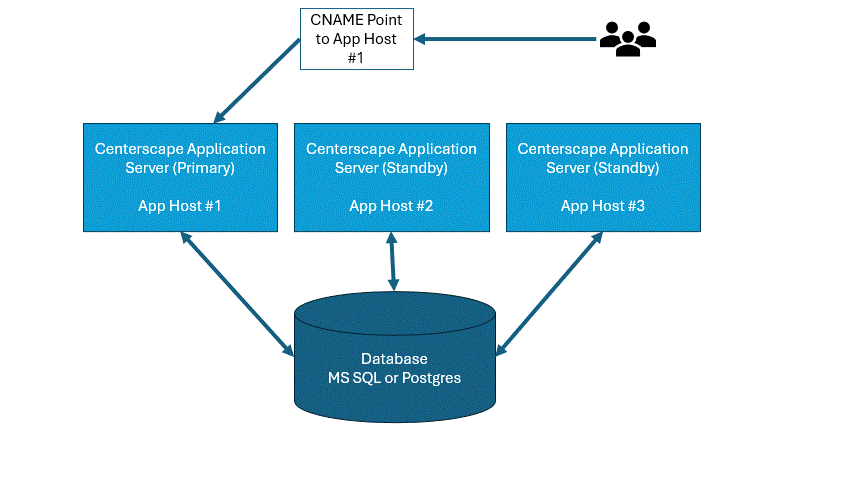
In the below example a primary host is in control of CenterScape. This host 'Owns' the database interactions and functions just like a CenterScape that does not have any standby Servers. AppHost #2 and #3 are connected to the database but they do not process any information. Their only role is to provide a heartbeat to register that they are available if needed to take over from the primary server. Users must log into the active primary server in order to use CenterScape
Promoting a Standby Server
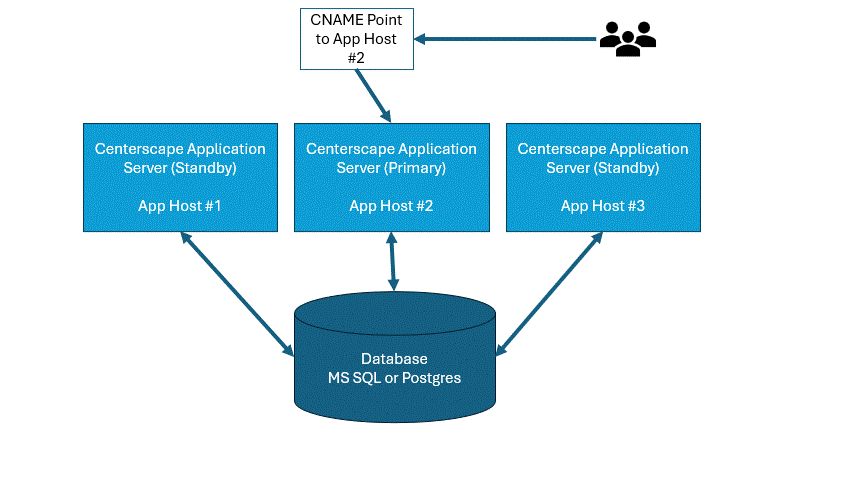
In the below example AppHost #2 was promoted to be the primary. The AppHost #1 server will disconnect as the active server and restart as a standby server just as AppHost #3. The AppHost #2 server will function as the primary until another standby server is promoted to primary.
Database Server
For standby servers to be viable, the database server needs to be on a separate host than the application server and that database host will need to be accessible by the same connection information on all active and standby systems. For large systems remote database servers may cause performance issues with realtime data acquisition. It is important that standby servers be tested to insure performance is equivalent to the active server prior to trusting that fail over or promotion of the standby server will work properly.
Note: Local Zone Manager instances are reset when a CenterScape goes from Active to Standby. The Local Zone Manager on the newly active server will be used to connect and utilize readers. Remote Zone Managers will be disconnected from by the demoted server and then connected to and taken over by the newly promoted active server