Setting Server Parameters
After logging into CenterScape the Admin Console will be displayed. If the user console is displayed switch to the admin console and navigate to the “Server” from the Configuration Menu.
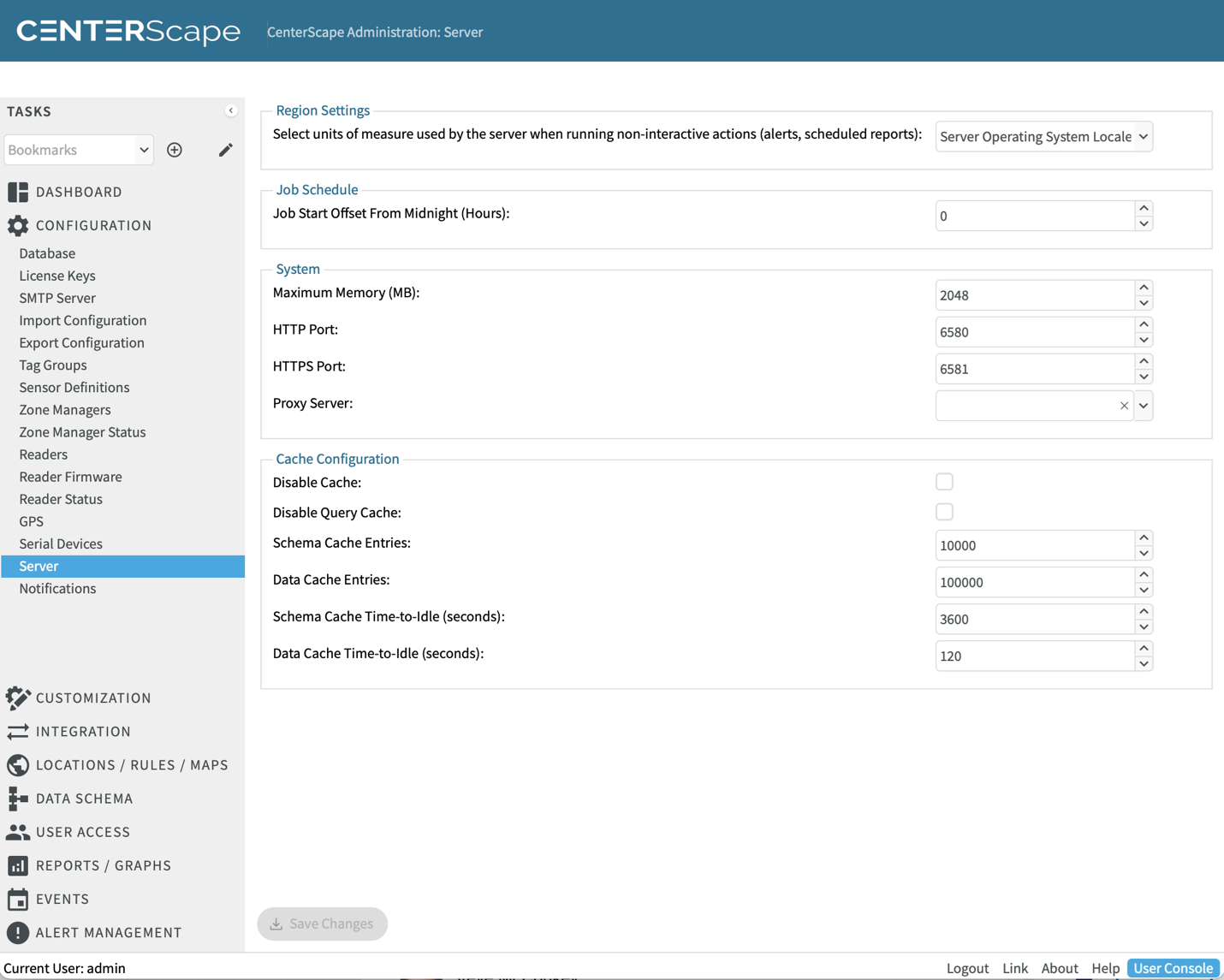
In this dialog are global server settings. These settings effect the whole of the CenterScape Application and are best set early in the configuration process.
| Attribute | Description |
|---|---|
| Region Settings | CenterScape’s web interface will automatically present information to users in the units of measure that the region of the reported web browser locale reported to CenterScape’s web server or on a per user basis. For graphs, reports, and alerts the units of measure will be based on this setting. “Server Operating System Local” will send Temperature units in Fahrenheit for a server with a United States Locale, while a server with an Australian locale will use Celsius. The locale of the server can be overridden by selecting English or Metric without changing locale of the server’s operating system. |
| Job Schedule | |
| Maximum Memory | This is the amount of server memory allocated to the Application Server’s Java runtime environment. The default is 2048MB, but should be increased based on system requirements discussed earlier. This setting can also be altered in the system.properties file. Changing the memory setting will require a restart of the Application Server. |
| HTTP Port | Web Server Port for Unencrypted Web Traffic. Changing this port will require an application restart. |
| HTTPS Port | Web Server Port for HTTPS or encrypted web traffic. Changing this port will require an application restart. |
| Proxy Server | Proxy servers can be used by CenterScape for HTTP/S post alert and report actions. Proxy server authentication is not supported. |
| Cache Configuration | Cache configuration is used by large systems with the help of RF Code support. It is not recommended that these settings be changed unless RF Code Support instructs to do so. |